
Guide
Airbnb dynamic pricing: the settings that make it pay
By Wasay Irfan, Lodging Gurus · Last updated October 26, 2026
Dynamic pricing changes your nightly rate every day from demand, how far out guests are booking and what comparable homes are charging, and it only pays when a person sets the base price, the floor and the stay rules the tool works inside. PriceLabs, the tool our team prices in, costs $14.49 per listing per month in the US or 1% of booking revenue (PriceLabs plans page, October 26, 2026) and ships with defaults built to fill calendars, including a last-minute discount that can reach 40% on its market-driven algorithm. One Perth client kept A$2,270 a year by capping that discount at 10%, which is the kind of setting this guide is about.
What does dynamic pricing on Airbnb actually change?
Dynamic pricing replaces one fixed nightly rate with a rate that moves every day. A tool such as PriceLabs, Wheelhouse or Beyond reads seasonality, local events, how far ahead guests in your market are booking, what comparable listings are charging and how full your own calendar is, then pushes a price for every date to Airbnb, Vrbo and Booking.com through your property management system (AirDNA's dynamic pricing guide, updated October 22, 2026, lists the same inputs). Airbnb's own version, Smart Pricing, says it uses "hundreds of factors about your listing and your area" to do the same inside a range you set (Airbnb Help Center, Smart Pricing, read October 26, 2026).
What the tool does not do is decide what the home is worth. PriceLabs' own blog draws the line the same way we do: the software handles the daily moves, and a person sets the floors, the minimum stays, the channels and whether the goal is occupancy or profit per stay (PriceLabs, dynamic pricing vs revenue management, updated September 20, 2026). Occupancy is the share of available nights that sell, the average daily rate (ADR) is the average price of a sold night and revenue per available night (RevPAR) multiplies the two, and a tool left on its defaults tends to buy the first at the expense of the second.
That is why our revenue management service is a person working inside PriceLabs every day, not a subscription to it. The rest of this guide is what that person sets and checks, so you can do it yourself or know what you are paying for.
Is Airbnb's Smart Pricing enough?
For a first listing that needs reviews, Smart Pricing is a free way to find out roughly where the market clears. For anything you want to earn properly from, no, for three reasons that Airbnb itself documents. Early-bird discounts can push the price a guest pays below the Smart Pricing minimum you set, weekly and monthly discounts take priority over it, and you have to turn it off to use weekend pricing or a rule-set (Airbnb Help Center, Smart Pricing, read October 26, 2026).
The bigger problem is incentive. Airbnb earns when a night sells, so its tool is built to sell nights, and Hostfully's June 12, 2026 comparison of the four main tools found it "consistently parks rates near your minimum". Smart Pricing also only prices Airbnb, so a home listed on Vrbo and Booking.com as well has two calendars the tool never sees. A paid tool prices every channel from one set of rules and shows you the breakdown behind each night, which is what makes the settings below possible.
What do dynamic pricing tools cost?
A paid tool costs about the same as one cleaning fee a month per listing. PriceLabs charges $14.49 per listing per month plus taxes in the United States, or 1% of booking revenue instead, with a 30-day trial and one automated price sync a day included (PriceLabs plans page, read October 26, 2026). Wheelhouse charges $19.99 per listing per month, $16.99 for 10 to 49 listings, or 1% of revenue with a $2.99 per listing monthly minimum (Wheelhouse pricing page, read October 26, 2026). Beyond's pricing page was not reachable when we checked on October 26, 2026, so we don't quote it here.
The number you type into any of these tools is the gross price. Most Airbnb hosts now pay a single host-only service fee of 15.5% of the nightly price plus any host fees, deducted from the payout, and the fee structure is mandatory for most hosts including everyone who connects software (Airbnb Help Center, service fees, read October 26, 2026). A $200 night pays out $169 before cleaning, so the floor you set has to be built from what you keep, which is the next section.
What the tools cost (each vendor's own page, read October 26, 2026)
| Tool | Price | Channels | What you still set |
|---|---|---|---|
| Airbnb Smart Pricing | Free | Airbnb only | A minimum and a maximum; discounts and rule-sets override it |
| PriceLabs | $14.49 per listing per month (US), or 1% of booking revenue; 30-day trial | Airbnb, Vrbo, Booking.com and 150+ PMS integrations | Base price, minimum, maximum, stay rules and 30+ customizations |
| Wheelhouse | $19.99 per listing per month, $16.99 for 10 to 49 listings, or 1% of revenue with a $2.99 minimum | Through your PMS and the main channels | Base price, minimum, maximum and stay rules |
| Lodging Gurus setup | Quoted per portfolio, one time | Your whole portfolio in PriceLabs | Nothing. We set the profiles, ladders, floors and gap rules, then hand it over |
Beyond's pricing page returned an error on October 26, 2026, so it is left out rather than quoted from a third party. Our one-time dynamic pricing setup and ongoing revenue management are priced on the pricing page.
How do you set the base price and the floor?
Price the exact trip your guest is shopping for, not the listing. We compare by usable capacity, because a three-bedroom sleeping ten competes with different homes than a three-bedroom sleeping six, and we match bathrooms, proper beds, pool, amenities and review quality before we look at a single rate. Then we price identical two-night, three-night and seven-night trips at the usual guest count and at full capacity. A home charging $250 a night plus $50 for each guest after six becomes $450 a night for ten guests, and a competitor charging $340 for everyone is cheaper by a wide margin before the cleaning fees even appear.
Split the owner's history into weekdays and weekends before trusting it. An owner who mostly sold Saturdays can show a strong annual ADR while the weekday calendar was priced wrong for a year, so we use the ADR to diagnose what sold rather than as the base price. The base price is then the rate at which the listing should sell an ordinary night in an ordinary week, and the tool moves up and down from there.
The floor is the number below which a booking costs you money, and it is different for a one-night stay, a two-night stay and an extension. Our rule: minimum nightly rent equals the nightly variable cost, plus the turnover cost the cleaning fee doesn't recover divided by the nights in the stay, plus the contribution you need toward overhead and profit, all divided by the share of rent you keep after channel and management deductions. An existing guest adding a night creates no new turnover, so the extension floor is lower and you can quote it generously without giving up contribution. Your annual plan still has to cover the fixed costs of owning the home on top.
The floor on one worked example
| Input | Example |
|---|---|
| Nightly variable cost (utilities, supplies, wear) | $30 |
| Turnover cost | $200 |
| Cleaning fee you keep after deductions | $150, so $50 of each turnover is unrecovered |
| Contribution you need toward overhead and profit | $50 a night |
| Share of rent you keep after channel and management deductions | 75% |
| Floor for a one-night stay | ($30 + $50 + $50) ÷ 0.75 = $173 |
| Floor for a two-night stay | ($30 + $25 + $50) ÷ 0.75 = $140 a night |
| Floor for an extension night | ($30 + $0 + $50) ÷ 0.75 = $107 |
Illustrative numbers. Put your own costs in and the result is the lowest minimum price the tool should ever be allowed to reach for each stay length.
Which PriceLabs defaults should you change?
All of them, deliberately, and each discount should have one job. PriceLabs documents its own defaults (PriceLabs help center, default discounts and premiums, read October 26, 2026). On its current market-driven algorithm, Hyper Local Pulse, the last-minute discount moves with the market up to a maximum of 40% and never applies beyond 60 days out, while the older algorithm applies a gradual 30% discount over the final 15 days. Gaps of two nights or fewer get a flat 20% discount. A far-out premium is on by default, starting 60 days out and capped at 20% on the market-driven version. An occupancy-based profile is applied automatically from your own performance, and a booking recency factor discounts the next 30 days by 5% to 15% depending on how long it has been since your last booking.
Those are reasonable defaults for a tool that has never seen your home. They are not a strategy. The table below is our starting configuration for a premium leisure home, which we then test against that home's own booking lead times. Huon's 10% cap in our Perth case study is a rate-protection setting, and whether it fits depends on when that home's guests book: if they normally book months ahead, a 14-day intervention arrives too late, and the curve needs to start earlier.
Our starting configuration for a premium leisure home
| Setting | Starting test | Why |
|---|---|---|
| Last-minute discount | 10% gradual within 14 days, so about 5% at seven days out and 10% on arrival day | Protects the rate; the Perth cap against the 30% default kept A$2,270 a year |
| Orphan gaps | One-night gaps 20% within seven days; two-night gaps 10% within 21 days; longer gaps 0% | Discounts land only on inventory that is actually distressed |
| Weekend orphans | No extra discount until the final seven days | An isolated Friday and Saturday pair is desirable inventory, not a problem |
| Far-out premium | Gradual premium from 120 days out, reaching 10% at 180 days | Modest protection that keeps the listing open to planners |
| Occupancy adjustment | Keep the market-driven profile at first, then read what it is doing | It responds to your occupancy relative to the market, which is the right signal once checked |
| Day-of-week adjustment | 0% | PriceLabs already prices day-of-week demand; a second layer double counts it |
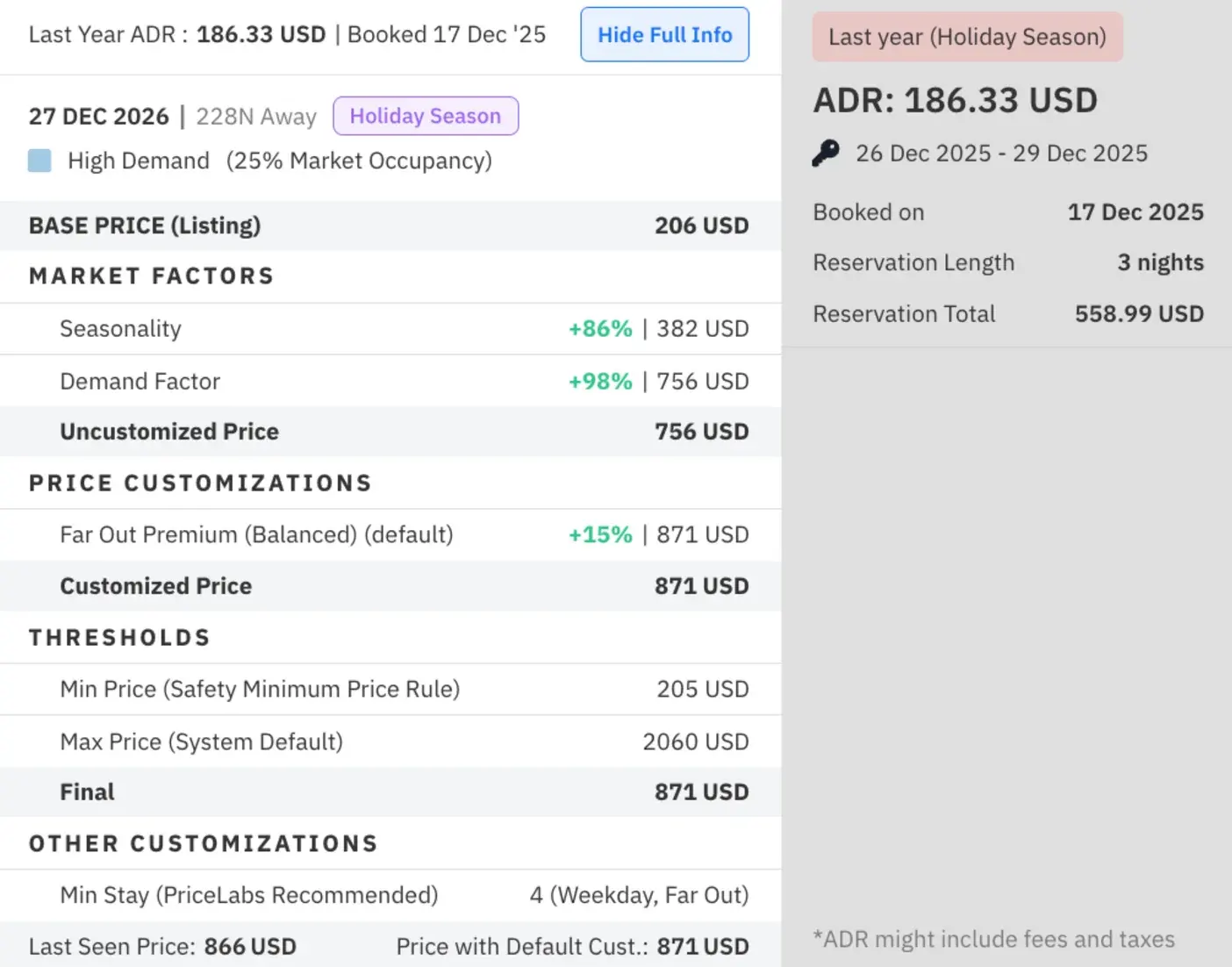
Four details catch owners out. First, the last-minute percentage only controls that one adjustment: a 10% last-minute discount with a separate 20% occupancy discount is a 28% cut, because 0.90 × 0.80 is 0.72, and occupancy adjustments stack on top of everything that isn't a fixed price (PriceLabs help center, customization hierarchy). Second, when the orphan, last-minute and adjacent-day adjustments are all discounts, PriceLabs applies the largest of the three, not the sum (PriceLabs help center, pricing customizations). Third, the occupancy profile is on until you remove it, so check it rather than assume. Fourth, a Safety Minimum Price built from last year's ADR for the same dates can hold a rate up even when your ordinary minimum is lower, which is the first thing we inspect when we take over a listing that refuses to come down in price.
What minimum stays should a dynamic-priced listing use?
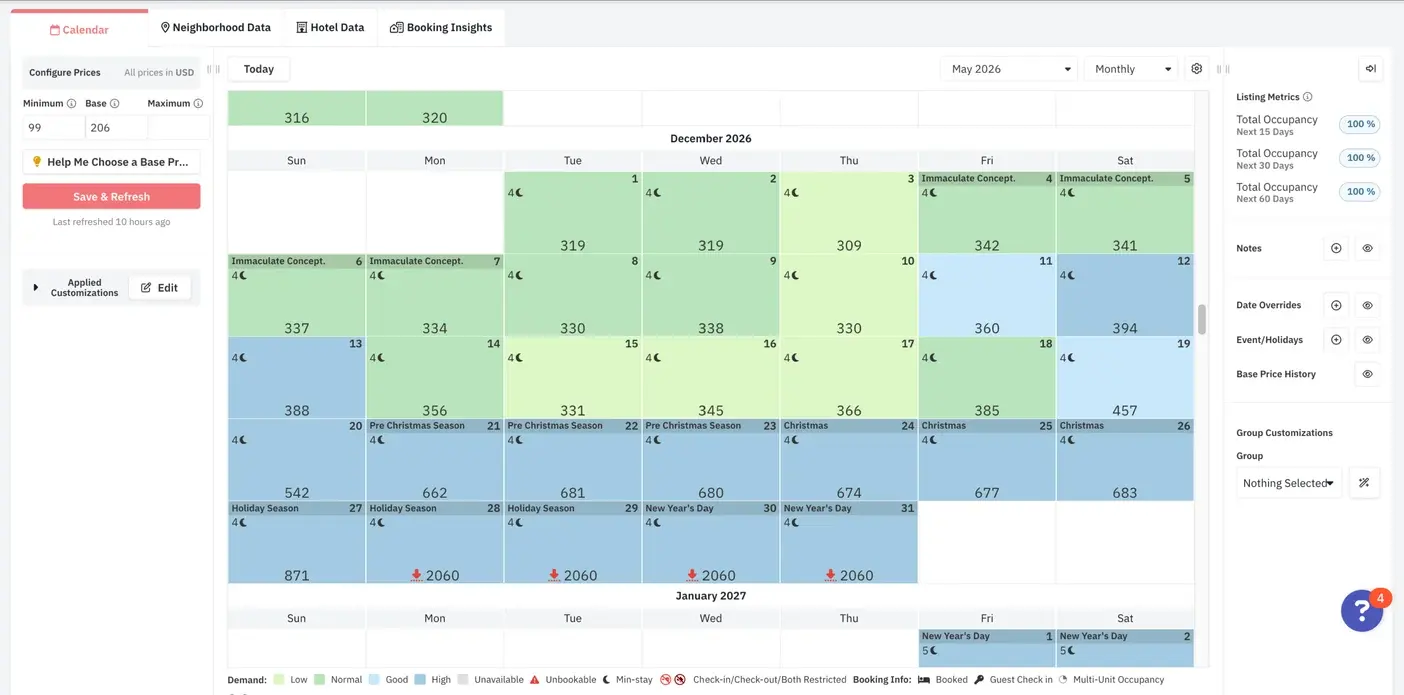
Protect complete weekends far out, then make shorter inventory deliberately bookable as the date approaches. A minimum-stay ladder does more for revenue than most price settings, because it decides whether the trip a guest wants can be booked at all. For larger leisure homes we start from the ladder below and adjust it to the booking window the home actually has.
Prevent gaps before you discount them. PriceLabs' Smart Check-in and Check-out feature, switched on by request where your channel supports it, Airbnb and Hostaway among them, blocks a checkout that would leave a one-night hole (PriceLabs help center, check-in and check-out feature, read October 26, 2026). We run that protection beyond 30 days out and relax it closer in. When a two-night gap does appear, sell it as a complete two-night stay by setting the orphan minimum to the length of the gap, then check the last-minute rule: PriceLabs lets an orphan minimum override the other minimum-stay settings only when it results in a lower number, so a one-night last-minute minimum can split the gap you meant to sell together (PriceLabs help center, customization hierarchy, read October 26, 2026). The same rule means orphan minimums can take priority over a date-specific minimum you set for an event, so re-check event dates after turning orphan rules on.
Offer the adjacent guest an extension first. For a Thursday hole, the guest leaving Wednesday or arriving Friday gets a quote for the extra night at the extension floor, after we confirm the cleaner can move. No new turnover makes it the best-margin night on the calendar. And after every sync, test the itineraries a guest would try: Friday to Sunday, Saturday to Monday and the exact gap dates, because minimum stays, arrival restrictions, preparation time and checkout rules interact, and a lower price helps nobody if the trip can't be booked. For events, shorten the restriction before cutting the rate: keep the longer minimum on the core nights and let the nights around them book more easily as the date approaches.
Our starting minimum-stay ladder for larger leisure homes
| Time before arrival | Ordinary weekdays | Friday or Saturday arrivals | Proven holiday or event demand |
|---|---|---|---|
| More than 90 days | 3 nights | 3 nights | 3 to 4 nights |
| 31 to 90 days | 2 nights | 3 nights | 3 to 4 nights |
| 8 to 30 days | 2 nights | 2 nights | 2 to 3 nights |
| 0 to 7 days | 2 nights | 2 nights | Review the remaining demand |
| An existing isolated gap | Match the gap, if the floor allows | Review individually | Check the event protection explicitly |
What does a before and after look like?
Measure completed stay periods against the same period a year earlier, never a pacing snapshot. A cabin in Hocking Hills, Ohio came onto our revenue management in October 2024. Its January to March revenue went from $29,412 in 2024 to $36,765 in 2025, an increase of $7,353, or 25%, on the same three winter months, from the owner's own reporting.
Two more from our published case studies. In Las Vegas the largest home in a 19-listing portfolio had entered August 2026 priced near $907 a night, 38% above the same month a year earlier, while its nights sold had fallen 57%; we held the weekend premium, brought the weekday rates back into line, left six of the 19 listings alone because they were priced right and the next booking landed 13 days later at $3,688 for three nights, with the 13 comparable listings finishing September 26.1% ahead of the previous September (case study). In Perth, four let rooms gained a length-of-stay layer on top of dynamic pricing and a 10% cap on last-minute discounts against the tool's 30% default, which protected A$2,270 a year (case study).
Three results, each measured against its own history
| Home | What changed | Before | After |
|---|---|---|---|
| Cabin, Hocking Hills, Ohio | Revenue management from October 2024 | January to March 2024: $29,412 | January to March 2025: $36,765 (+25%) |
| Largest home in a Las Vegas portfolio | Weekday rates brought back in line, weekend premium held | August 2026: $907 a night, nights sold down 57% | Next booking 13 days later: $3,688 for three nights |
| Four let rooms, Perth | Last-minute discount capped at 10% against the 30% default | Tool default: 30% | A$2,270 a year protected |
The Las Vegas and Perth figures and their method are on the case study pages. The Hocking Hills figures are the owner's reported revenue for the same three months a year apart.
What does the weekly review look like once the tool is set?
The tool reprices daily; a person reviews weekly, and the review is where the money is. Every week our revenue manager works through the next 14, 30, 60 and 180 days with a specific question for each window, compares the calendar with where it stood at the same point last year rather than with where last year finished, and checks each new booking's contribution after fees and incremental costs, so an occupancy gain that produced a weak margin gets caught.
Three checks earn their place more than any other. We track the competitors that booked and disappeared from availability, because the listings still showing a price are the unsold inventory, and copying their asking rates anchors you to homes that are also struggling. We inspect nights that keep landing on the same number and read the price breakdown before lowering the base price, because a binding seasonal, weekend or historical floor will stop a base-price cut from touching the dates you care about. And we preview the Airbnb quote after every material rule change: an Airbnb discount can reduce the rate PriceLabs sent, and Airbnb calculates a custom promotion from your 60-day median price rather than today's rate, so the percentage a guest sees can differ from the discount you thought you set (Airbnb Help Center, custom promotions, read October 26, 2026).
The weekly review
| Window | The question | What it decides |
|---|---|---|
| Next 14 days | Which gaps and weekends remain, and can a guest actually book them? | Fix restrictions, offer extensions, then consider a targeted discount |
| Next 15 to 30 days | How much revenue was added in the last seven days after cancellations? | Separate pickup from bookings that only replaced cancellations |
| Next 31 to 60 days | Are weekdays and weekends pacing differently from comparable homes? | Adjust the weak dates separately |
| Same time last year | What was already booked at this exact lead time? | Compare equivalent stages of the booking curve |
| Market | Is the slowdown larger or smaller than the comp set's? | Separate a property problem from a market one |
| Next 61 to 180 days | Are valuable weekends selling unusually early? Are event floors and maximums right? | Test higher remaining rates or revise the far-out protection |
| Each new booking | What did it contribute after fees and incremental costs? | Catch occupancy gains with weak margins |
The mistakes owners make with dynamic pricing
These are the three we fix most often when an owner has been running the tool alone.
- Treating the last-minute percentage as a limit on every discount that can touch a reservation. It limits one adjustment; occupancy, gap and channel discounts stack or compete with it under their own rules.
- Discounting dates while minimum stays, arrival restrictions or checkout rules keep the intended trip unbookable. The price was never the problem.
- Celebrating high occupancy without checking how early the premium dates sold, how many turnovers they created and what the owner kept after fees and cleaning.
What Lodging Gurus does with dynamic pricing
Two options, both in PriceLabs. The one-time dynamic pricing setup builds the account and every listing: seasonal profiles and demand-based rate ladders, rule hierarchies by stay length, booking window and demand, base price calibration for every unit and bedroom type, minimum and maximum price logic that fits your goals and gap-fill and last-minute rules built in, then hands it to you. It is quoted per portfolio.
Ongoing revenue management is the weekly review above done for you, with daily pricing, the ladders kept current and ongoing listing optimization, from $100 per listing per month for one or two listings down to $25 per listing for 50 to 100, with a weekly strategy call with our founders, one of whom is a PriceLabs Ambassador. On full management it is a $12 per listing add-on. Prices are on the pricing page, and if you are weighing a flat fee against a percentage manager, the fees guide sets the two side by side. If you don't see the value in your first 30 days, you don't pay for them.
Common questions
Dynamic pricing, answered.
Usually, yes. A paid tool costs $14.49 to $19.99 per listing per month (PriceLabs and Wheelhouse, October 26, 2026), which one correctly priced peak weekend repays. The condition is that someone sets the base price, the floor and the minimum stays and reviews the calendar weekly; a tool left on its defaults mostly discounts.
On Airbnb's Smart Pricing, an early-bird discount can push the guest's price below the minimum you set, and weekly and monthly discounts take priority over it (Airbnb Help Center). In PriceLabs, percentage discounts can't go below the listing's minimum price, but orphan and last-minute settings have their own minimums, so check all three.
A rule of thumb from one consultant, not an Airbnb policy: hold about 75% of nights at your target rate, discount the rest and never go below 55% of target. We don't use fixed ratios. We compare the calendar with the same lead time last year and with the comp set, then act on the specific dates that are behind.
Daily. PriceLabs includes one automated sync a day (plans page, October 26, 2026), which is enough for prices; the human review is weekly, and the minimum-stay ladder changes as each date moves from far out to last minute.
It depends on the host's settings, not on Airbnb. Most pricing tools add a premium far out and discount close in, so booking early often costs more; a host who runs an early-bird discount reverses that. On the homes we price, the far-out premium is modest and the last-minute discount is capped, so neither window is a bargain.
No. The host-only fee is 15.5% of the nightly price plus host fees for most hosts (Airbnb Help Center, October 26, 2026), so the fee rises and falls with the price but the rate stays the same. The pricing tool's subscription is a separate cost you pay the vendor.
Every source was read on October 26, 2026. Tool prices and defaults change, so check the vendor's page before you rely on a figure. Company names are trademarks of their owners; we're not affiliated with any of them.
Sources
- Airbnb Help Center, Smart Pricing (article 1168), read October 26, 2026
- Airbnb Help Center, discounts and how they stack (article 2061), read October 26, 2026
- Airbnb Help Center, service fees (article 1857), read October 26, 2026
- Airbnb Help Center, custom promotions and the 60-day median price (article 2719), read October 26, 2026
- PriceLabs plans and pricing, read October 26, 2026
- PriceLabs help center, default discounts and premiums, read October 26, 2026
- PriceLabs help center, pricing customizations, read October 26, 2026
- PriceLabs help center, customization hierarchy, read October 26, 2026
- PriceLabs help center, check-in and check-out feature, read October 26, 2026
- PriceLabs, dynamic pricing vs revenue management (updated September 20, 2026)
- Wheelhouse pricing, read October 26, 2026
- Hostfully, Airbnb pricing tools compared (June 12, 2026)
- AirDNA, Airbnb dynamic pricing guide (updated October 22, 2026)
- Lodging Gurus, Las Vegas revenue management case study
- Lodging Gurus, Perth cleaning fee and discount case study
